Google+
Showing posts with label Shuttle. Show all posts

Monday, 29 July 2013

My first proper mod. Shuttle 120mm fan.

So I've began modding a 120mm fan into the top of my Shuttle XPC. The hole is a bit rough as it was trickier and louder than I expected with a Dremel, but with a metal file it shouldn't take too long to sort out. Trying to find some U-channel rubber for the edging in the UK is a pain also! I also have a minimal black circular grill to allow maximum air flow and hopefully avoid anything falling into the fan. 

The only down side to this mod is I lose a hard drive bay in the top of the shuttle. With three in there its not a massive loss, especially since I got a HP mini server for use as a NAS.


Next I have a 80mm side fan to do. That is going to make getting the case on and off a bit tricky though as its tight for space inside. I really need an in-take fan though as I have a lot of exhaust fans. 

Wednesday, 10 April 2013

Shuttle SP35p2 and a AMD HD 7870 will work happily.

Everything went beautifully with the upgrade in physical terms.

UPDATE: Sadly after months of trying to diagnose the reboots I was getting I seem to have established that the cards cooler is pretty poor. I saw temps as high as 80oC in the case. I even modded a 120mm into the roof of the shuttle (looks so cool with blue LEDs) but I could not get it to stay cool.

I think it's only once ever got to the end of a run of 3D Mark and that was when I under clocked the card massively using the catalyst drivers sliders.It's pretty disapointing. You would have thought they would have designed the coolers to force the hot air out of the case and though the fins that way instead of having such as open design.

Even with the case off and all fans at 100% (it sounds like a jet engine) you still reboots.

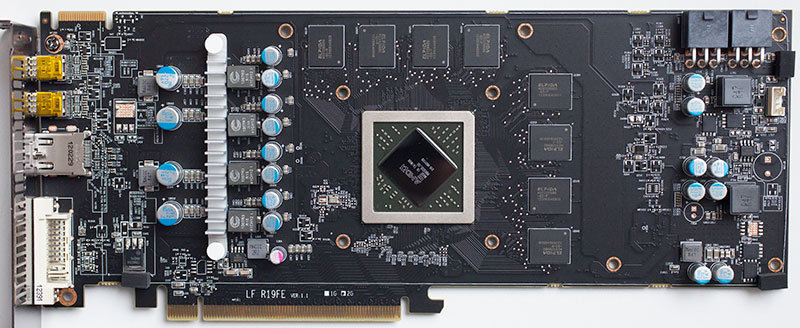
The old GTX 275:

Without the GPU:

The new card (left) and the old (right):

Top down view:

The new card going in:

Everything back in the case:


PSU info (I doubt the Shuttle PC55 would make a difference as it not got the same efficiency rating):


Friday, 5 April 2013

Shuttle SP35P2 Vs VTX3D HD 7870 Black Edition 2 GB

Time to see if a VTX3D HD 7870 will fit in my Shuttle. It's in the post. It'll be replacing a Nvdia Asus GTX 275. It recommends a 500W power supply and the shuttle has a 450W gold PSU so it'll be an interesting combo. I just hope it fits! 


Replacing my old GTX 275:


Tuesday, 11 December 2012

Graphics upgrade?

OK so I have some fairly hefty constraints on what I can upgrade my ageing Shuttle PC with.

First and foremost is power constraints with only a 450W PSU in the case ...
Then comes dimensions...With a precarious motherboard power connected in the lower left. I barely got my GTX 275 in there!

http://www.tomshardware.com/reviews/geforce-gtx-275,2266-14.html

http://www.nvidia.co.uk/object/graphics_cards_buy_now_uk.html

I'm thinking this Zotac will fit the bill in terms of size and power draw.

http://www.ebuyer.com/393783-zotac-gtx-660-ti-2gb-gddr5-dual-dvi-hdmi-displayport-pci-e-graphics-zt-60801-10p


Friday, 13 January 2012

Shuttle SP35P2 Bios and memory configuration

The Shuttle SP35P2 Bios and memory configuration isn't exactly easy if you want to use your memory at 1066Mhz. Mainly because the memory sticks are usually only tested to the 1600 speed, but built to slower 800Mhz specification at which the motherboard will recognise it!

Here is the description on my Kingston Hyper X memory:

DESCRIPTION
Kingston’s KHX8500D2K2/4G is a kit of two 256M x 64-bit 
2GB (2048MB) DDR2-1066 CL5 SDRAM (Synchronous 
DRAM) memory modules, based on sixteen 128M x 8-bit 
DDR2 FBGA components per module. Total kit capacity is 
4GB (4096MB). Each module pair has been tested to run at 
DDR2-1066MHz at a latency timing of 5-5-5-15 at 2.2V. The 
SPD is programmed to JEDEC standard latency 800Mhz 
timing of 5-5-5-18 at 1.8V. Each 240-pin DIMM uses gold 
contact fingers and requires +1.8V. The electrical and mechanical specifications are as follows  


So in the shuttle bios you need to up the voltage to 2.2v and set the values manually. I found the ratio to use was a 2:1 FSB with my Core 2 Duo Quad Q6700 (This will vary depending on your CPU and Rated FSB)